
Printed materials can remain in circulation long after a marketing campaign has been launched. Product catalogs, brochures, packaging, instruction cards, trade show displays, and retail signage may all contain QR codes or other links that open augmented reality experiences. This creates a lasting connection between physical marketing and digital product content. However, keeping that connection useful requires more than ensuring that a link continues to open.
The product model behind the experience must also remain accurate. A customer scanning a QR code on a printed furniture catalog may expect to examine the exact table shown on the page. Someone scanning packaging may want to inspect the product's shape, size, and components before making a purchase. If the digital representation contains incorrect proportions, dimensions, materials, or missing details, the experience can create expectations that the physical product cannot meet.
Automatically generated 3D models make it easier to prepare digital content for large product collections, but they still require careful evaluation. Businesses must understand how the model was created, compare it with reliable references, and approve it before connecting it to printed materials. Once a campaign is distributed, correcting an inaccurate asset can be considerably more difficult.
Printed Campaigns Give Digital Errors a Longer Life
A digital advertisement can often be updated quickly. A printed brochure or product catalog is different. Thousands of copies may already have been distributed to customers, retail locations, sales representatives, or business partners. Even if the company corrects the online content, the printed material may continue directing people to the same campaign.
This creates a particular risk when the linked 3D model is inaccurate. A furniture manufacturer might distribute a catalog showing a cabinet with a QR code that opens an interactive model. If the model has an incorrect depth or missing shelves, customers may rely on misleading information while comparing the product with alternatives.
The problem can become more complicated when printed materials are reused. A retailer might keep a brochure available for several months, even after the product has been revised. If the digital model is updated without checking the physical product version shown in the brochure, customers may scan the code and see a different design.
Businesses should therefore treat printed campaigns as long-term content commitments. Before a QR code is distributed, the linked model should be checked against the exact product and version represented in the printed material.
Converting Product Visuals Into Digital Models
Many businesses begin creating interactive product content with images they already use in catalogs, brochures, and online stores. These photographs can provide a useful starting point, particularly when a company has a large collection of products to represent.
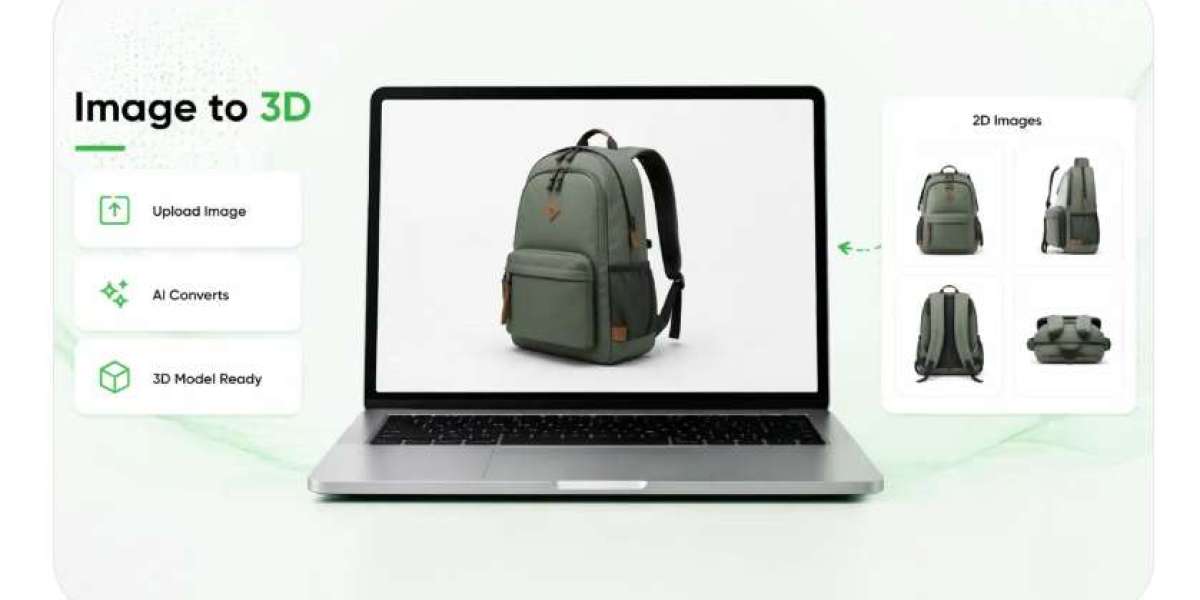
A 2d to ar converter can help transform product visuals into digital models suitable for interactive experiences. This can reduce the amount of manual preparation required, but the output should not automatically be considered a faithful reconstruction of the physical item.
Photographs show only the visible information captured by the camera. A front-facing image of a storage cabinet may show its doors and handles but reveal very little about its depth, internal structure, or rear panels. A photograph of a chair may make the seat appear wider because of perspective or hide the shape of its supporting frame.
Automated generation may interpret these missing areas based on the available visual information. The resulting model can look convincing while containing features that differ from the actual product.
Businesses should prepare suitable reference materials before converting images. Multiple photographs, technical drawings, verified measurements, and product samples can help establish what the model should represent. The team should also identify the exact product variation so that images from different versions are not accidentally combined.
This preparation is especially important when printed materials contain several similar products. A catalog might show multiple chairs with different frame designs or a range of appliances with nearly identical appearances. Each model needs to be associated with the correct product information.
Identify the Product Details That Matter Most
Not every product requires the same level of modeling detail. The features that matter most depend on how customers use the digital representation and what they need to understand before purchasing.
For a piece of furniture, important features may include the shape of the frame, seat thickness, leg placement, armrests, and upholstery. For an appliance, customers may pay more attention to its doors, control panels, handles, vents, and connections. Packaging may require accurate closures, labels, caps, folds, and container shapes.
Businesses should identify these important characteristics before reviewing the generated model. Otherwise, reviewers may focus on general appearance while overlooking features that influence purchasing decisions.
Consider a printed brochure promoting a modular shelving system. The overall model may look similar to the product, but incorrect shelf positions or missing support components could make the system appear more flexible than it really is. Customers might assume that certain configurations are possible when the physical product does not support them.
A product-specific review checklist helps teams focus on meaningful details. It also makes the approval process more consistent when several people are evaluating different models for the same campaign.
Proportions Must Match the Physical Design
Proportions describe how the different parts of a product relate to one another. They are important because a model can have approximately correct overall dimensions while still looking noticeably different from the real item.
A chair may have the correct height and width but an oversized backrest. A desk might appear realistic until someone notices that its legs are too narrow or its drawers occupy too much space. These differences can affect how customers judge the product's appearance, construction, and suitability.
Appliances also depend on accurate proportions. The relationship between a refrigerator door, handle, control panel, and body contributes to its overall design. If one element is enlarged or placed incorrectly, the model may not communicate the same product that appears in the printed advertisement.
Reviewers should compare the model from several angles rather than relying on one attractive view. They should examine the overall silhouette, the relative size of major components, and the spacing between structural features.
Printed materials often show products from carefully selected photographic angles. The interactive model, however, may allow customers to rotate the item and inspect surfaces that were not visible in the original image. This makes proportional accuracy especially important.
Dimensions Need to Be Verified Independently
A model should not be approved based solely on how realistic it looks. Height, width, and depth need to be checked against dependable product measurements.
These dimensions influence practical decisions. A customer examining a wardrobe may want to know whether it fits within an available wall space. Someone considering a kitchen appliance may need to understand its depth before deciding whether it will fit between cabinets. Incorrect measurements can turn an otherwise useful digital representation into a source of confusion.
Photographs are not reliable measurement tools on their own. Camera distance, lens characteristics, perspective, and image cropping can change the apparent size of an object. A product photographed from a low angle may look taller, while a side view may exaggerate or hide its depth.
Businesses should use manufacturer specifications, technical drawings, or measurements from verified physical samples. Where a product has several sizes, each version should be checked separately.
The team should also consider features that affect the usable dimensions. Handles, protruding controls, removable trays, and door openings may influence how much space a product needs. A model that represents only the main body can leave customers with an incomplete understanding of its physical footprint.
When a printed campaign is intended to remain active for an extended period, these measurements should be documented alongside the approved model. That record makes later updates and corrections easier to manage.
Material and Surface Differences Can Mislead Customers
A product's material is part of its identity. Customers may distinguish between natural wood and laminate, brushed metal and polished steel, or woven fabric and smooth synthetic upholstery. A generated model that uses the wrong surface appearance can misrepresent the product even when its geometry is accurate.
Reference photographs should be reviewed under suitable lighting conditions. Reflections, shadows, and color adjustments in promotional images can make materials appear different from their real appearance. Automated generation may interpret these effects as part of the surface itself.
For example, a metal appliance photographed under strong studio lighting may appear glossy even if its actual finish is matte. A wooden cabinet may have a warm color in a photograph because of the surrounding lighting rather than the material's true tone.
Reviewers should compare the model's color, texture, reflectivity, and finish with product references that show the item clearly. If the printed campaign promotes a particular finish, the linked model should represent that version rather than a similar alternative.
This matters for products where material differences influence price, quality expectations, or suitability. A customer who expects a particular finish may be disappointed if the delivered product looks noticeably different.
3D Creation and Evaluation Require More Than One Reference
An Image to 3D workflow can turn product photographs into the foundation of a digital model, but the creation process should be supported by a separate evaluation stage. The original image is a starting reference, not proof that every surface and component has been reconstructed correctly.
Multiple photographs help reviewers inspect parts of the product that a single image cannot reveal. Front, side, rear, and angled views can expose differences in geometry, proportions, and component placement. Close-up photographs are useful for checking smaller details such as stitching, fasteners, buttons, labels, and decorative features.
For example, a manufacturer preparing a printed catalog for outdoor equipment may use product photographs showing the front and side of a machine. Additional images might be needed to inspect its rear connections, protective covers, handles, and attachments. Without these references, the generated model could contain simplified or invented details.
The references should also be current. If a manufacturer has redesigned a product, older photographs may no longer show the correct construction. A model created from outdated images can appear accurate compared with those references while still being wrong for the product currently being sold.
Businesses should connect every model to its supporting photographs and specifications. This allows reviewers to trace individual design decisions back to reliable evidence.
Components and Accessories Need Clear Representation
Some products are made up of multiple parts that customers may need to inspect separately. These can include detachable shelves, removable trays, adjustable supports, accessories, covers, and replacement components.
An automatically generated model may simplify these parts or place them incorrectly. A handle might appear attached to the wrong area, a removable shelf may look fixed, or an accessory could be shown as part of the standard product when it is sold separately.
These errors are particularly risky when the model is linked from a printed advertisement. Customers may keep a brochure or product card for reference and assume that the interactive experience represents the exact package being offered.
Businesses should check which components are included with the product and which are optional. The model should not imply that a separate accessory is included in the purchase. Where different configurations exist, each should be represented and labeled appropriately.
The relationship between components should also be checked. A detachable part should fit correctly, and adjustable elements should be shown in positions that the physical product can actually support.
Clear component information reduces the likelihood of misunderstandings between marketing, sales teams, and customers.
Approval Should Happen Before Printed Distribution
Once printed materials have been produced, correcting their content can be difficult or expensive. A QR code may be impossible to change without replacing the printed item, so businesses should make sure the linked model has been reviewed before the material enters circulation.
The approval process should include both visual and product-level checks. A 3D specialist can examine the geometry, while a product expert can compare dimensions, materials, and components with official specifications. Marketing teams can then confirm that the approved model corresponds to the product shown in the brochure or packaging.
Approval criteria should be documented. These may include:
Correct overall proportions and verified dimensions.
Accurate materials, colors, and visible finishes.
Complete and correctly positioned components.
Consistency with current reference photographs.
Correct association with the product variation shown in print.
The final approval should identify the model version and the printed campaign it supports. This helps prevent an unapproved replacement from being connected to an existing QR code later.
If the physical product changes, the business should review the linked model before deciding whether the printed campaign can continue using it. A revised model may be necessary, or the printed material may need to be withdrawn if it no longer describes the available product.
What Inaccurate Models Can Cost a Business
Publishing an inaccurate model can create consequences that extend beyond a disappointing digital experience. Customers may make purchasing decisions based on incorrect dimensions, misunderstand the materials, or expect components that are not included.
A customer who scans a furniture brochure might choose a cabinet believing it will fit a particular space. If the model understates its depth, the actual product could create installation problems. Someone inspecting an appliance may expect a particular control arrangement or finish that does not match the delivered item.
These differences can lead to returns, complaints, additional support requests, and disputes about product descriptions. They can also weaken confidence in the printed material itself. Customers may become less willing to rely on other product information provided by the same business.
There is also a risk of inconsistency across campaigns. An inaccurate model might be reused in a new catalog, on a distributor's website, or in a retail display. Unless the original error is corrected at its source, it can continue appearing in multiple customer touchpoints.
Businesses should have a process for reporting model inaccuracies and identifying every campaign that uses the affected asset. Correcting the model alone may not be enough if outdated versions remain connected to old printed materials.
Keep Printed and Digital Product Information in Agreement
Printed campaigns and interactive models should be managed as connected parts of the same product communication process. The product shown in the brochure, the model opened by the QR code, and the physical item available for purchase should all describe the same version.
This requires clear asset records, reliable reference photographs, verified measurements, and documented approvals. It also requires businesses to review models whenever product designs or specifications change.
A printed QR code may remain active for months, but that does not mean the content behind it should remain untouched. Businesses should periodically confirm that the linked model is still accurate and that customers are not being shown an outdated design.
The strongest long-term approach is to make accuracy a requirement before publication and maintain it throughout the campaign's life. When proportions, dimensions, materials, small details, and components are checked against dependable references, interactive models become more trustworthy.
Printed materials may be difficult to replace once distributed, but the digital experiences they connect to can still be managed responsibly. By approving accurate models and maintaining clear links between products, references, and campaign versions, businesses can reduce customer confusion and protect the credibility of their marketing.