
.STL or .3MF files ready for slicing.Step 1: Match Scanner Precision to Your 3D Printer Technology
Standard FDM / FFF Filament Printers (0.4 mm Nozzle): Most desktop filament printers extrude at 0.16 to 0.20 mm layer heights, meaning physical surface detail tops out around 0.10 mm. A wireless scanner rated at
0.03–0.05 mmaccuracy already captures finer geometry than a standard FDM nozzle can lay down.MSLA / DLP Resin Printers: High-resolution monochrome LCD resin printers resolve features down to
0.03–0.05 mm. When duplicating figurines, jewelry masters, coins, or dental models, a narrow-field blue LED structured-light scanner rated at0.01–0.02 mmpreserves micro-reliefs that wider-angle units blur.Multi-Color Filament & Full-Color Printing: If you run a multi-material filament system or outsource full-color resin prints, verify that the scanner includes an RGB texture camera capable of exporting color-mapped
.OBJor.3MFfiles.
Step 2: Best 3D Scanners for 3D Printing by Category (US Market)
| Printing Category | Recommended Scanner | Optical Technology & Accuracy | Object Size Range | Approximate US Price | Key Advantage for 3D Printing |
| Best Overall Hybrid All-Rounder | Revopoint POP 4 | 30 blue cross lasers + 1 deep-hole line + Full-Field & VCSEL (0.03 mm laser) | 10 mm – 2 m (0.4 in – 6.5 ft) | ~$671–$872 USD | Scans dark filaments, shiny car trim, and organic props without matting spray; exports .STL, .3MF, and .splat |
| Best for Resin Miniatures & Coins | Revopoint MINI 2 / 3DMakerpro Seal | Blue LED structured light (0.01–0.02 mm) | 10 – 300 mm (0.4 – 12 in) | ~$663–$829 USD | Short focal distance resolves crisp micro-details on small, light-colored models |
| Best Budget Entry for FDM Parts | Revopoint INSPIRE 2 / Creality CR-Scan Otter | IR laser + structured light (0.05 mm) | 20 mm – 2 m (0.8 in – 6.5 ft) | ~$350–$549 USD | Lightweight, full-color wireless capture for everyday brackets, household replacements, and props |
| Best for Cosplay & Large Props | Revopoint RANGE 3 | Wireless VCSEL + multi-line IR laser (0.05 mm + 1 mm/m) | 20 mm – 4 m (0.8 in – 13 ft) | ~$351–$369 USD | Wide field of view and 100,000 lux sunlight resistance keep tracking steady on helmets, armor, and furniture |
| Best for Functional & Metal Parts | Revopoint MetroX / Creality CR-Scan Raptor | Multi-line blue laser + structured light (0.02 mm) | 10 mm – 1 m (0.4 in – 3.3 ft) | ~$699–$999 USD | Reads matte-black ABS, carbon fiber, and bare aluminum natively with tight dimensional stability |
| Best PC-Free Standalone Handheld | Revopoint MIRACO / Plus | Dual-range structured light (0.04–0.05 mm) | 10 mm – 4 m (0.4 in – 13 ft) | ~$1,274–$2,199 USD | Built-in touchscreen, CPU, and battery let you capture, fuse, and trim meshes directly in a garage or workshop |
Step 3: Surface Finish, Computing Power, and Software Checks
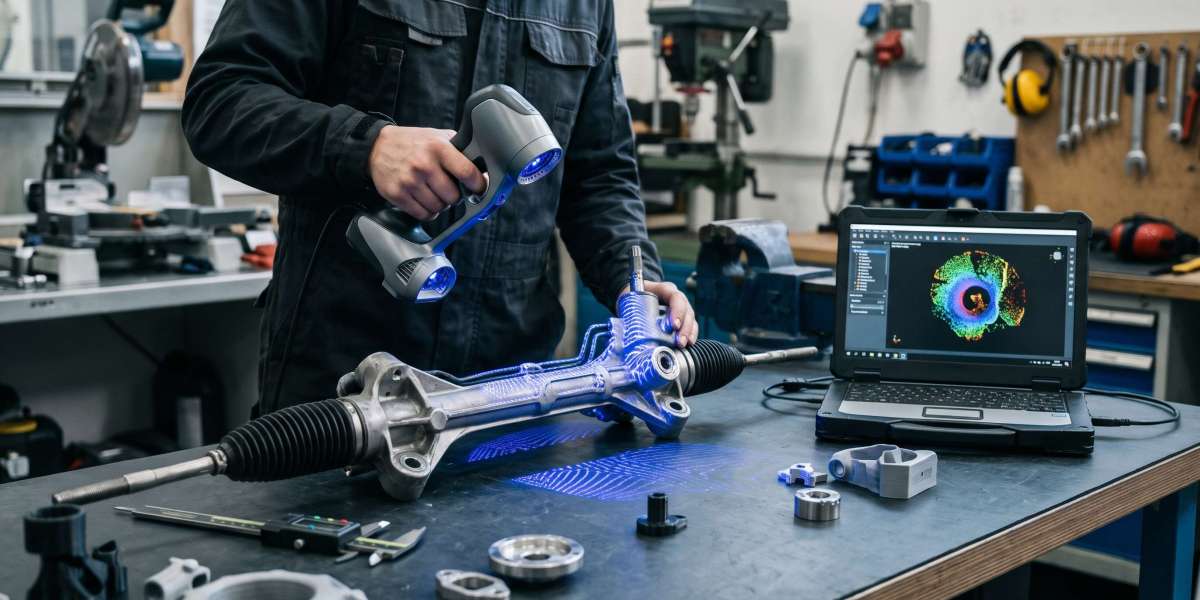
Spray-Free Blue Laser vs. Structured Light: Standard infrared and LED structured-light scanners struggle on matte-black PLA, glossy helmets, and bare metal unless coated in temporary matting spray. If you routinely scan dark or metallic parts, choose a multi-line blue laser scanner (Revopoint POP 4, MetroX, or Creality CR-Scan Raptor). Keep sublimating 3D scanning spray on hand for clear glass, transparent resin, and mirror-finish chrome, where it creates a temporary matte film and evaporates cleanly within hours without residue.
Workstation GPU vs. Mobile Convenience: Wireless structured-light scanners run smoothly on standard creator laptops or smartphones over Wi-Fi 6. High-speed multi-line blue laser scanners streaming 60 to 105 FPS rely on real-time GPU processing—pair them with a Windows 10/11 PC featuring 16–32 GB of RAM and a discrete NVIDIA RTX 3060/4060 or newer GPU, or choose an all-in-one standalone handheld like the Revopoint MIRACO when scanning away from a desk.
Direct Slicing vs. Scan-to-CAD Editing: Free capture suites—such as Revo Scan / Revo Metro (Revopoint), JMStudio (3DMakerpro), and CrealityScan—include built-in hole-filling and polygon decimation to export watertight
.STLand.3MFfiles. When you need to resize bolt holes, thicken walls, or adjust clearances on a broken mechanical part before printing, bring the mesh into dedicated Scan-to-CAD software such as Revo Design or Fusion 360.
Four Essential Habits for Trouble-Free Scan-to-Print Results
Scan Small Parts Twice to Close the Base: Place objects on a motorized turntable for a complete 360-degree capture, then lay the part on its side for a second pass. Merging both scans in software closes the underside completely so the model sits flat on your build plate.
Inspect Untextured Geometry Before Exporting: Photographic RGB color textures can make a soft scan look sharper on screen than the underlying polygon mesh actually is. Toggle off color shading inside your capture app to verify crisp edges before slicing.
Decimate Heavy Meshes for Faster Slicing: Raw high-resolution scans often exceed two million triangles, slowing down slicer support generation. Export a simplified mesh between 150,000 and 350,000 polygons to keep slicing fast without losing visible print detail.
Calibrate Regularly With the Included Board: Temperature shifts or travel bumps can slightly alter stereo camera alignment—run a quick five-minute calibration check whenever starting critical fitment projects.