
Smartphone speakers play an important role in everyday communication, entertainment, and online activities. Whether you are making calls, listening to music, watching videos, or attending virtual meetings, clear sound is essential. However, problems such as low volume, distorted audio, crackling sounds, or completely silent speakers can make using your device frustrating. Smartphone Solutions helps customers explore suitable repair options for common mobile device problems. If you are searching for dependable assistance from Smartphone Solutions El Paso, visit yoursmartphonesolutions.com to learn more about available smartphone repair services.
Some speaker problems can be resolved with simple troubleshooting, such as cleaning the speaker grille or adjusting audio settings. However, persistent sound issues may indicate hardware damage that requires professional inspection and repair.
Table of Contents
Common Smartphone Speaker Problems
What Causes Smartphone Speaker Issues?
How to Troubleshoot Speaker Problems
When Do You Need Professional Speaker Repair?
How Professional Smartphone Speaker Repair Works
Tips to Protect Your Smartphone Speakers
Frequently Asked Questions
Conclusion and Call to Action
1. Common Smartphone Speaker Problems
Smartphone speaker problems can appear in different ways. Recognizing the symptoms can help you understand what might be wrong.
Low Speaker Volume
If your phone produces very quiet sound even when the volume is turned up, the speaker grille may be blocked by dust or debris. Incorrect audio settings or damaged speaker components can also cause low volume.
Distorted or Crackling Sound
Crackling, buzzing, or distorted audio may indicate a damaged speaker. These symptoms can become more noticeable when playing music or watching videos at higher volume levels.
No Sound From the Speaker
Sometimes, a smartphone may stop producing sound entirely. This can happen because of software glitches, incorrect audio output settings, hardware failure, or damaged internal connections.
Intermittent Audio
If sound repeatedly cuts in and out, the problem may involve loose internal connections, software issues, or a malfunctioning speaker component.
Poor Sound During Calls
If people cannot hear you clearly or call audio sounds unusually quiet, the issue may involve the earpiece speaker, microphone, network connection, or audio settings.
2. What Causes Smartphone Speaker Issues?
Several factors can affect smartphone speaker performance.
Dust and debris: Dirt can accumulate inside speaker openings and block sound.
Water exposure: Moisture can damage delicate speaker components and internal connections.
Physical damage: Accidental drops or impacts may affect the speaker assembly.
Software glitches: Operating system errors or application problems can interfere with audio output.
Excessive volume: Regularly playing audio at maximum volume may contribute to speaker wear over time.
Hardware deterioration: Older speakers may gradually lose sound quality or stop functioning correctly.
Identifying the actual cause is important before attempting repairs.
3. How to Troubleshoot Speaker Problems
Before seeking professional repair, try these basic troubleshooting steps.
Check Volume and Sound Settings
Make sure media volume, ringtone volume, and call volume are adjusted correctly. Also check whether silent mode or other sound restrictions are enabled.
Disconnect Bluetooth Devices
Your smartphone may be sending audio to wireless headphones, speakers, or another connected device. Turn off Bluetooth temporarily and test the built-in speaker again.
Restart Your Phone
A temporary software issue may interrupt audio functionality. Restarting your smartphone can sometimes restore normal speaker performance.
Clean the Speaker Grille Carefully
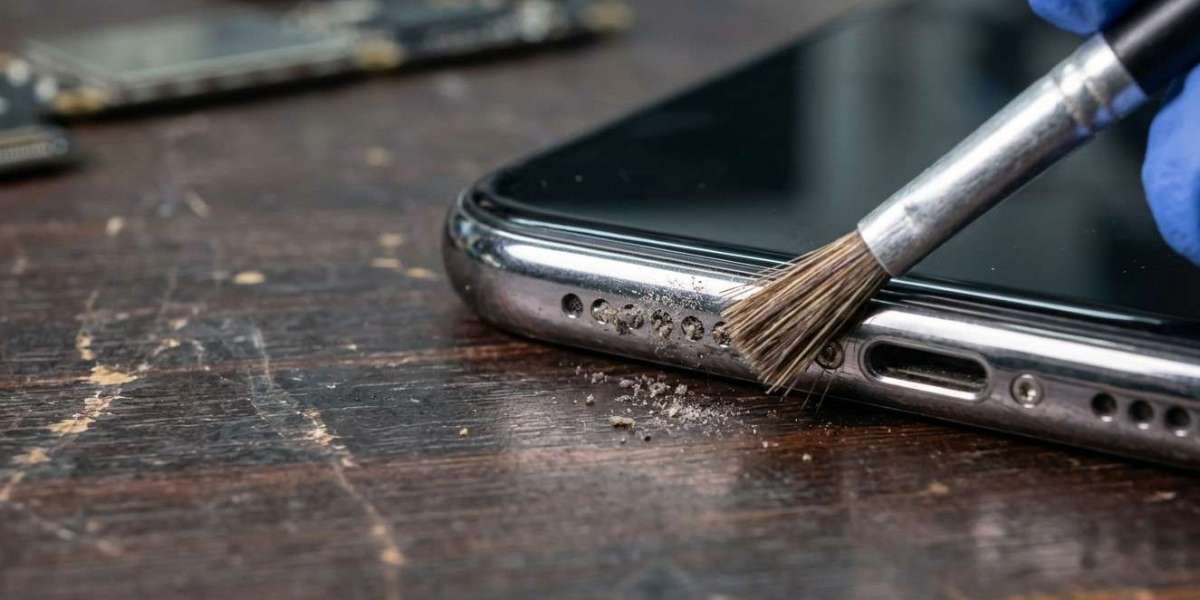
Use a clean, soft, dry brush to gently remove visible dust from the speaker opening. Avoid sharp objects, excessive pressure, and liquids.
Update Your Software
Install available operating system and application updates. Updates may resolve software bugs affecting audio performance.
If these steps do not solve the problem, professional inspection may be necessary.
4. When Do You Need Professional Speaker Repair?
Some speaker problems cannot be fixed through basic troubleshooting.
Consider professional repair if:
Your speaker produces no sound.
Audio remains distorted after cleaning.
The speaker stops working after water exposure.
Sound repeatedly cuts out during playback.
Your phone has suffered physical damage.
Call audio remains unclear despite checking settings.
The speaker grille or internal components appear damaged.
Ignoring persistent problems may affect your overall smartphone experience and could allow existing hardware issues to worsen.
5. How Professional Smartphone Speaker Repair Works
Professional technicians can inspect your device and identify the source of audio problems.
Speaker Inspection: A technician checks the speaker grille, audio output, and relevant components to identify possible damage.
Speaker Cleaning: If dust or debris is affecting sound quality, careful cleaning may help restore normal audio performance.
Speaker Replacement: If the speaker assembly is damaged, replacement may be recommended after evaluating the device.
Internal Connection Repair: Loose or damaged connections may require professional attention to restore reliable audio.
Software Diagnosis: Technicians can also investigate system errors and application-related problems that interfere with sound.
At Smartphone Solutions, customers can explore repair options for common smartphone issues and find assistance for their device concerns.
6. Tips to Protect Your Smartphone Speakers
Good maintenance can help keep your phone speakers working properly.
Keep your phone away from excessive dust and moisture.
Clean speaker openings gently and regularly.
Use a protective case to reduce physical damage.
Avoid exposing your device to liquids.
Keep your smartphone software updated.
Avoid playing audio at maximum volume for extended periods.
Get unusual audio problems inspected early.
These habits can help maintain sound quality and reduce unnecessary damage.
7. Frequently Asked Questions
1. Why is my smartphone speaker suddenly so quiet?
Dust, incorrect volume settings, Bluetooth connections, software glitches, or speaker damage can cause low volume.
2. Can water damage affect smartphone speakers?
Yes. Moisture can interfere with speaker components and internal connections, causing muffled, distorted, or missing audio.
3. How can I fix a crackling phone speaker?
Start by checking volume settings, disconnecting Bluetooth devices, restarting your phone, and gently cleaning the speaker grille. If crackling continues, seek professional inspection.
4. Is smartphone speaker replacement expensive?
The cost depends on the phone model, speaker type, replacement part, and repair complexity. Ask a repair provider for an estimate before approving the work.
5. Can a software update fix speaker problems?
Yes, if the issue is caused by a software bug. However, updates cannot repair physically damaged speaker components.
8. Conclusion and Call to Action
Smartphone speaker problems can affect calls, music playback, videos, and everyday communication. Low volume, distorted sound, crackling, and missing audio may result from dust, moisture, software issues, or damaged hardware. While basic troubleshooting can resolve some problems, persistent audio issues may require professional repair.
Regular maintenance and timely inspection can help protect your device and maintain sound quality. Smartphone Solutions helps customers explore dependable mobile repair options. If you are looking for professional assistance from Smartphone Solutions El Paso, visit yoursmartphonesolutions.com to explore available services.
Having trouble hearing sound from your smartphone? Visit Smartphone Solutions today to explore your repair options and get your device's audio working properly again!