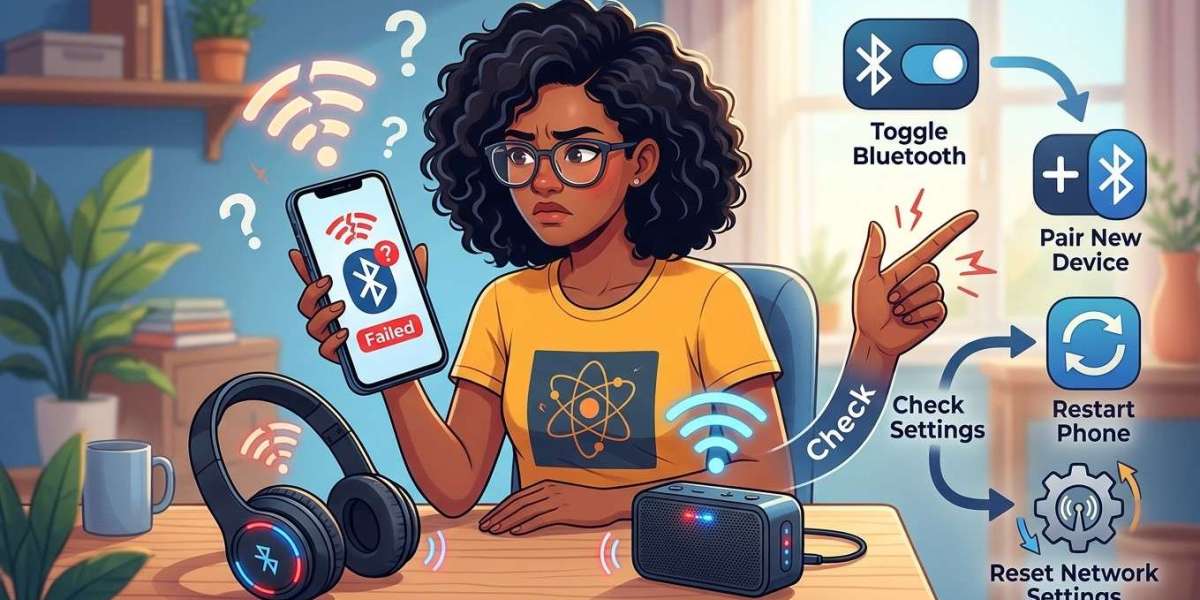

Bluetooth makes it easy to connect smartphones to wireless headphones, speakers, smartwatches, car audio systems, and other devices. However, connection problems can prevent these accessories from working properly. Your phone may fail to detect nearby devices, disconnect unexpectedly, or refuse to pair. These issues can result from incorrect settings, outdated software, interference, or hardware problems. If basic troubleshooting does not help, Mobile Phone Repair Albany can be a resource to explore for professional phone repair assistance.
Table of Contents
Common Reasons Bluetooth Is Not Connecting
How to Fix Bluetooth Connection Problems
When to Seek Professional Phone Repair
Tips to Prevent Bluetooth Issues
Frequently Asked Questions
1. Common Reasons Bluetooth Is Not Connecting
Understanding the possible cause can make troubleshooting easier.
Bluetooth Is Turned Off
Your phone may not connect simply because Bluetooth is disabled. Some devices also have separate settings that control whether they are discoverable.
Devices Are Not in Pairing Mode
Wireless headphones, speakers, and other accessories usually need to be placed in pairing mode before your phone can detect them.
Devices Are Too Far Apart
Bluetooth connections have a limited range. Walls, furniture, and other obstacles can weaken the signal.
Outdated Software
An outdated phone operating system or accessory firmware may create compatibility problems and prevent successful pairing.
Too Many Connected Devices
Some Bluetooth accessories have limits on simultaneous connections. An accessory already connected to another phone may not pair with yours.
Temporary Software Glitches
A minor system error can interfere with Bluetooth functions, causing failed connections or unexpected disconnections.
2. How to Fix Bluetooth Connection Problems
Try these simple solutions before arranging a repair.
Turn Bluetooth Off and On
Open your phone's settings, switch Bluetooth off, wait a few seconds, and turn it back on. This can refresh the wireless connection.
Restart Both Devices
Restart your smartphone and the Bluetooth accessory. Then place the accessory in pairing mode and try connecting again.
Move Devices Closer Together
Keep your phone and accessory nearby while pairing. Reduce obstacles and move away from sources of possible wireless interference.
Forget and Re-Pair the Device
Open your Bluetooth settings, select the accessory, and choose the option to forget or unpair it. Put the accessory back into pairing mode and reconnect it.
Check Battery Levels
Low battery power can affect the performance of some wireless accessories. Charge your headphones, speaker, or smartwatch before trying again.
Disconnect Other Devices
If your accessory is connected to another phone or tablet, disconnect it and try pairing with your smartphone again.
Update Your Phone's Software
Check for available system updates. Installing the latest compatible version may resolve bugs affecting Bluetooth connectivity.
Reset Network Settings
If other methods fail, consider resetting your phone's network settings. This may erase saved Wi-Fi networks, passwords, and Bluetooth pairings, so be prepared to reconnect your devices.
3. When to Seek Professional Phone Repair
If Bluetooth still does not work after troubleshooting, your smartphone may have a hardware-related problem.
Consider professional inspection if:
Bluetooth will not turn on.
Your phone cannot detect any nearby accessories.
Bluetooth disconnects repeatedly with different devices.
Connectivity problems began after a drop or water exposure.
Other wireless functions are also malfunctioning.
If you are searching for Mobile Phone Repair Albany NY, visit mobilephonerepairalbany.com to explore repair information and available service options.
4. Tips to Prevent Bluetooth Issues
Follow these habits to maintain reliable wireless connectivity:
Keep your phone's operating system updated.
Charge wireless accessories regularly.
Disconnect devices you no longer use.
Avoid unnecessary wireless interference.
Keep Bluetooth accessories within their recommended range.
Protect your smartphone from physical damage and moisture.
Good device maintenance can help reduce connectivity problems and improve everyday performance.
5. Frequently Asked Questions
Why is my phone not finding Bluetooth devices?
Bluetooth may be disabled, the accessory may not be in pairing mode, or the devices may be too far apart.
Why does my Bluetooth keep disconnecting?
Possible causes include low accessory battery, wireless interference, outdated software, or hardware problems.
Can restarting my phone fix Bluetooth issues?
Yes. Restarting can clear temporary software glitches that interfere with wireless connections.
Why won't my phone connect to my car's Bluetooth?
Your phone or car system may have an old pairing saved, compatibility issues, or an incorrect pairing configuration. Try removing the old pairing and connecting again.
Can a damaged phone affect Bluetooth connectivity?
Yes. Physical damage or internal component problems may interfere with Bluetooth functionality and require professional diagnosis.
Conclusion
Bluetooth connection problems can result from pairing errors, low battery levels, outdated software, wireless interference, or internal hardware faults. Start by restarting both devices, checking pairing mode, and reconnecting your accessory. If the problem continues, professional inspection may help identify the cause. Mobile Phone Repair Albany, mobilephonerepairalbany.com, and Mobile Phone Repair Albany NY are useful search terms when exploring local smartphone repair information.
Call to Action
Having trouble connecting your phone to Bluetooth headphones, speakers, or your car? Visit mobilephonerepairalbany.com to explore available repair options. Get your smartphone checked and take the next step toward reliable wireless connectivity.